


| App Name | Magisk Manager |
| Developer | Topjohnwu |
| Category | Tools |
| Size | 12.10M |
| Latest Version | 0495468d |


Magisk Manager is the essential Android app for managing root access on your device. Once you've rooted your device, it allows you to control and grant superuser permissions to applications. For added security, it supports biometric verification, requiring your fingerprint or face to approve any root access requests.
Magisk Manager Features:
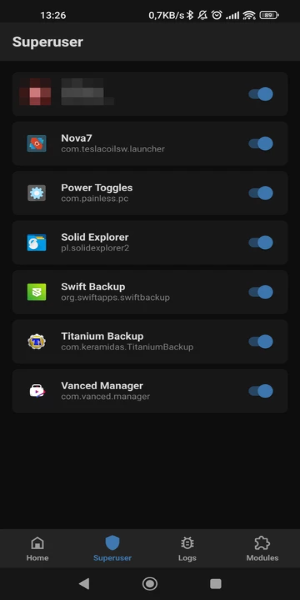
❤ Manage Root Permissions: Magisk Manager gives you complete control over root permissions on your Android device. After unlocking the bootloader and flashing the required root files, you can use this app to manage and grant root access to other apps that need it.
❤ Enhanced Security: To boost security, Magisk Manager includes biometric authentication. This lets you approve superuser permissions only after verifying your identity via fingerprint or facial recognition.
❤ Install Root Modules: Magisk Manager also enables you to install various modules that expand root functionality. For instance, you can install the SafetyNet Fix module, which helps hide root access and an unlocked bootloader from specific apps.
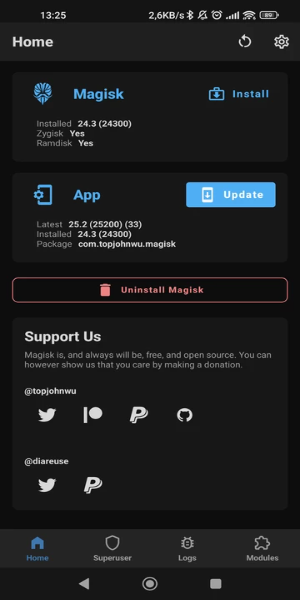
❤ Boost Efficiency with Zygisk: From its settings, you can enable Magisk with Zygisk. This feature allows developers to build more efficient modules by preloading resources into system memory, enhancing their performance.
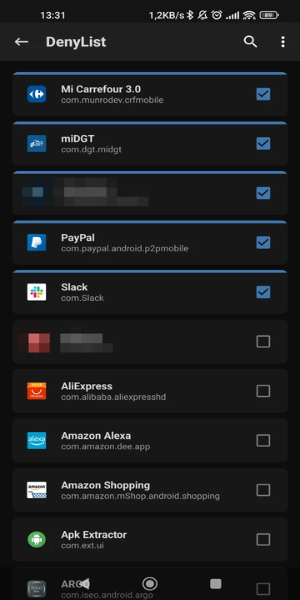
❤ Hide Root from Apps: You can selectively hide root access from certain applications. This lets you use apps like games, banking, and payment apps without restrictions or issues caused by having a rooted device.
Frequently Asked Questions:
❤ What is Magisk Manager?
Magisk Manager is the official app for managing root access on Android. It lets users grant or deny root permissions to apps and install various modules to extend root capabilities.
❤ Can I uninstall Magisk Manager?
Yes, you can uninstall the app if you no longer wish to use root features. However, uninstalling Magisk Manager alone does not remove root access from your device. You will need to follow separate steps to fully unroot your device.
❤ Is Magisk Manager safe to use?
Magisk Manager is generally considered safe when used correctly and when modules are sourced from trusted providers. However, rooting your device and installing third-party modules always involves some risk, so caution is advised.
Design and User Experience
Intuitive Root Management
Magisk Manager offers a clean, user-friendly interface for managing root permissions on Android. Its streamlined dashboard makes it easy to grant or deny root access to any app.
Biometric Security Integration
The app strengthens security through integrated biometric authentication. You can set up fingerprint or facial recognition as a mandatory step for approving superuser requests, adding a vital layer of protection.
Simple Setup Process
Magisk Manager provides clear guidance through the initial setup, including bootloader unlocking and file flashing. The process is straightforward and designed to be accessible, even for those new to rooting.
Clear Permission Control
All apps requesting root access are listed in one centralized view. This clear overview allows for quick permission adjustments and easy monitoring of app activity.
Regular Updates and Support
The app is regularly updated to maintain compatibility with the latest Android versions and rooting techniques. Users benefit from continuous support and functional improvements.
What's New
This update includes minor bug fixes and general improvements. Install or update to the latest version to experience the enhancements!
-
 Sonic Racing: CrossWorlds Characters and Tracks Revealed for Upcoming Closed Network Test
-
 Marvel Rivals Season 1 Release Date Revealed
-
 Announcing Path of Exile 2: Guide to Sisters of Garukhan Expansion
-
 RAID Shadow Legends: Mythical Champions Tier List Revealed
-
 Honkai: Star Rail Update Unveils Penacony Conclusion
-
 Best Model Kits for Adults in 2025: Ultimate Guide