


| App Name | S Note |
| Developer | Samsung Electronics Co., Ltd. |
| Category | Lifestyle |
| Size | 30.80M |
| Latest Version | 5.2.05.1 |


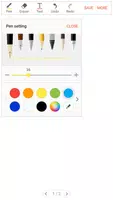


S Note is a powerful note-taking app from Samsung, built for Galaxy devices. It lets you create, organize, and share notes effortlessly. You can handwrite, type, and attach images, audio recordings, or sketches. Customize your notes with fonts, colors, and layouts for personal or professional use.
S Note Features:
- Versatile Note-Taking: Write and draw freely, insert media, and categorize notes to fit your workflow.
- Seamless Syncing: Sync notes across your devices with a Samsung or Evernote account for access anywhere.
- Personalization: Insert charts, sketches, photos, voice memos, and custom backgrounds to make notes your own.
- Extension Pack: Add quick-access tools, shape recognition, and text transformations for enhanced productivity.
Frequently Asked Questions:
- Does S Note work with devices that don’t have an S Pen?
Yes, but certain S Pen-exclusive features won’t be accessible.
- What permissions does S Note use?
S Note needs storage access for files, with optional permissions for camera, microphone, location, and calendar.
- How do I create charts in S Note?
Use the Easy chart tool, available on Galaxy Note series devices, to build and insert various chart types.
Final Thoughts:
S Note is a robust note-taking solution with rich features, customization, and smooth syncing. With the Extension pack and Easy chart function, it becomes even more engaging and versatile. Students, professionals, and creatives alike can rely on S Note to keep ideas, plans, and information in order. Try it today and transform how you take notes.
Latest version 5.2.05.1 release notes
Updated April 27, 2023
Improved app stability
-
 Sonic Racing: CrossWorlds Characters and Tracks Revealed for Upcoming Closed Network Test
-
 Marvel Rivals Season 1 Release Date Revealed
-
 RAID Shadow Legends: Mythical Champions Tier List Revealed
-
 Announcing Path of Exile 2: Guide to Sisters of Garukhan Expansion
-
 Honkai: Star Rail Update Unveils Penacony Conclusion
-
 Best Model Kits for Adults in 2025: Ultimate Guide