

Fortnite Spending Tracker Launched

Track Your Fortnite Spending: A Comprehensive Guide
Fortnite is free, but its enticing skins can lead to unexpected spending. This guide shows you how to monitor your Fortnite expenditures to avoid financial surprises. We'll explore two methods: checking your Epic Games Store account and utilizing the Fortnite.gg website.
Why Track Spending? Unmonitored in-game purchases can quickly accumulate. The potential for significant, unforeseen expenses highlights the importance of regular spending checks.
Method 1: Reviewing Your Epic Games Store Account
All V-Buck purchases are recorded in your Epic Games Store account, regardless of platform or payment method. Follow these steps:
- Access the Epic Games Store website and log in.
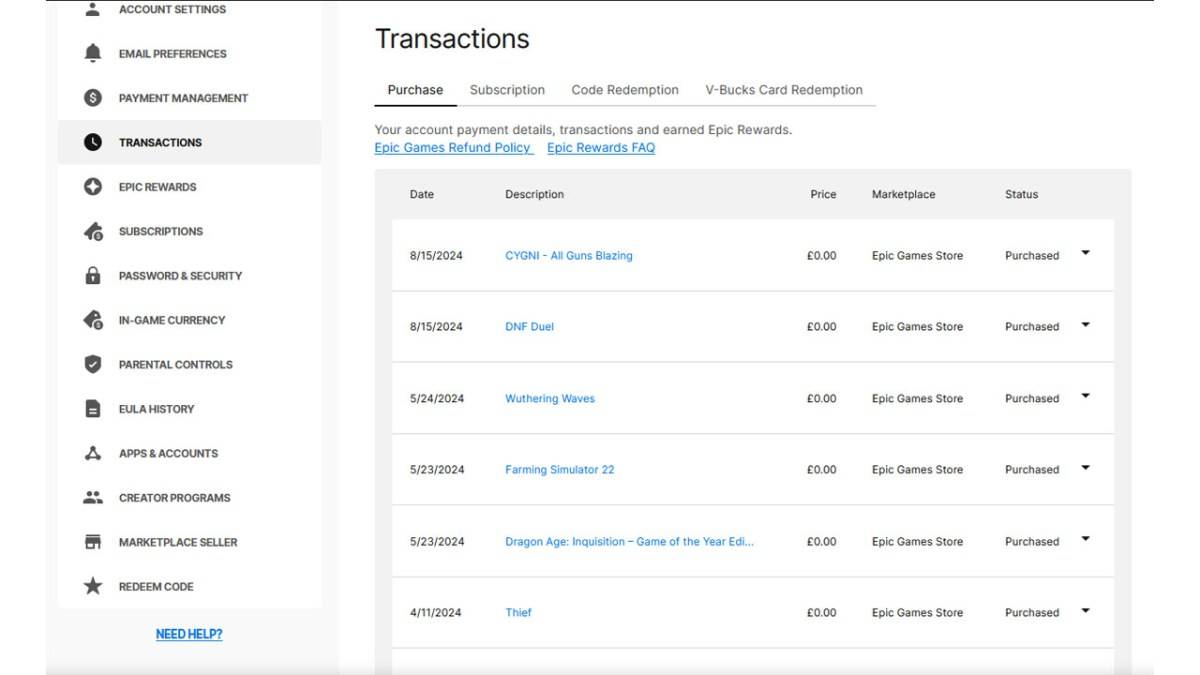
- Click your username (top right corner), then select "Account," and finally "Transactions."
- On the "Purchase" tab, scroll through your transactions, clicking "Show More" as needed.
- Identify entries showing "5,000 V-Bucks" (or similar amounts), noting both the V-Bucks and currency values.
- Use a calculator to sum your total V-Bucks and corresponding currency spent.
Important Considerations:
- Free Epic Games Store games will appear as transactions; scroll past these.
- V-Buck card redemptions might not display a dollar amount.
Method 2: Utilizing Fortnite.gg
As noted by Dot Esports, Fortnite.gg offers a manual tracking method:
- Visit Fortnite.gg and log in (or create an account).
- Navigate to "My Locker."
- Manually add each purchased outfit and item from your Cosmetics section (click the item, then "+ Locker"). You can also search for items.
- Your locker will then display the total V-Buck value of your acquired items. Use a V-Buck to dollar converter for an approximate currency equivalent.
While neither method is perfectly automated, they provide effective ways to track your Fortnite spending.
Fortnite is available on various platforms, including Meta Quest 2 and 3.
-
 FVH - Free Video HiderFVH - Free Video Hider is the ultimate tool to keep your private videos away from prying eyes. With just one tap, you can securely hide personal videos from your gallery, ensuring no one accidentally sees your intimate moments or sensitive recording
 -
 ADDISON OneClick ScanSimplify your tax filing with the ADDISON OneClick Scan app. Stop searching for misplaced receipts or struggling with paper clutter. This app lets you quickly digitize receipts and send them directly to your tax professional in just a few taps. Adva
 -
 Home Flip: Crazy Jump MasterFlip your ragdoll body through challenging obstacles and nail the perfect backflip onto your bed!Feeling exhausted and craving a good night’s sleep? Let go and tumble like a ragdoll—flip your way to bed!In Home Flip: Crazy Jump Master, leap and soar
 -
 Anilyme Plus TopAiringChartAnilyme Plus TopAiringChart is a complete tool for anime fans to keep up with the newest series. It features a clean, easy-to-use interface that lets you track the most popular currently airing anime in real time. With personalized picks, a simple n
 -
 UC Mini-Download Video StatusUC Mini is the ultimate video browser, providing a fast and secure way to find answers with its integrated search engine. It boasts a massive library of movies, TV series, and entertaining clips, enhancing your everyday entertainment. Experience swi
 -
 BrosixBoost your team’s collaboration and output with the Brosix app—a secure and efficient team messaging solution that keeps everyone connected while on the move. Never miss critical updates thanks to offline messages and push notifications. This cross-
-
 Marvel Rivals Season 1 Release Date Revealed
-
 Sonic Racing: CrossWorlds Characters and Tracks Revealed for Upcoming Closed Network Test
-
 Honkai: Star Rail Update Unveils Penacony Conclusion
-
 Announcing Path of Exile 2: Guide to Sisters of Garukhan Expansion
-
 Ubisoft Cancels Assassin's Creed Shadows Early Access