

Freedom Wars Remastered: How To Use Your Accessory
Quick Links
Freedom Wars Remastered allows you to deploy three comrades alongside your Accessory during Operations. While comrade gear upgrades are limited to overall level increases, your Accessory offers more customization options. You can issue unique commands and tailor your Accessory's equipment for enhanced combat effectiveness. This guide details Accessory customization and command selection.
How To Customize Your Accessory In Freedom Wars Remastered
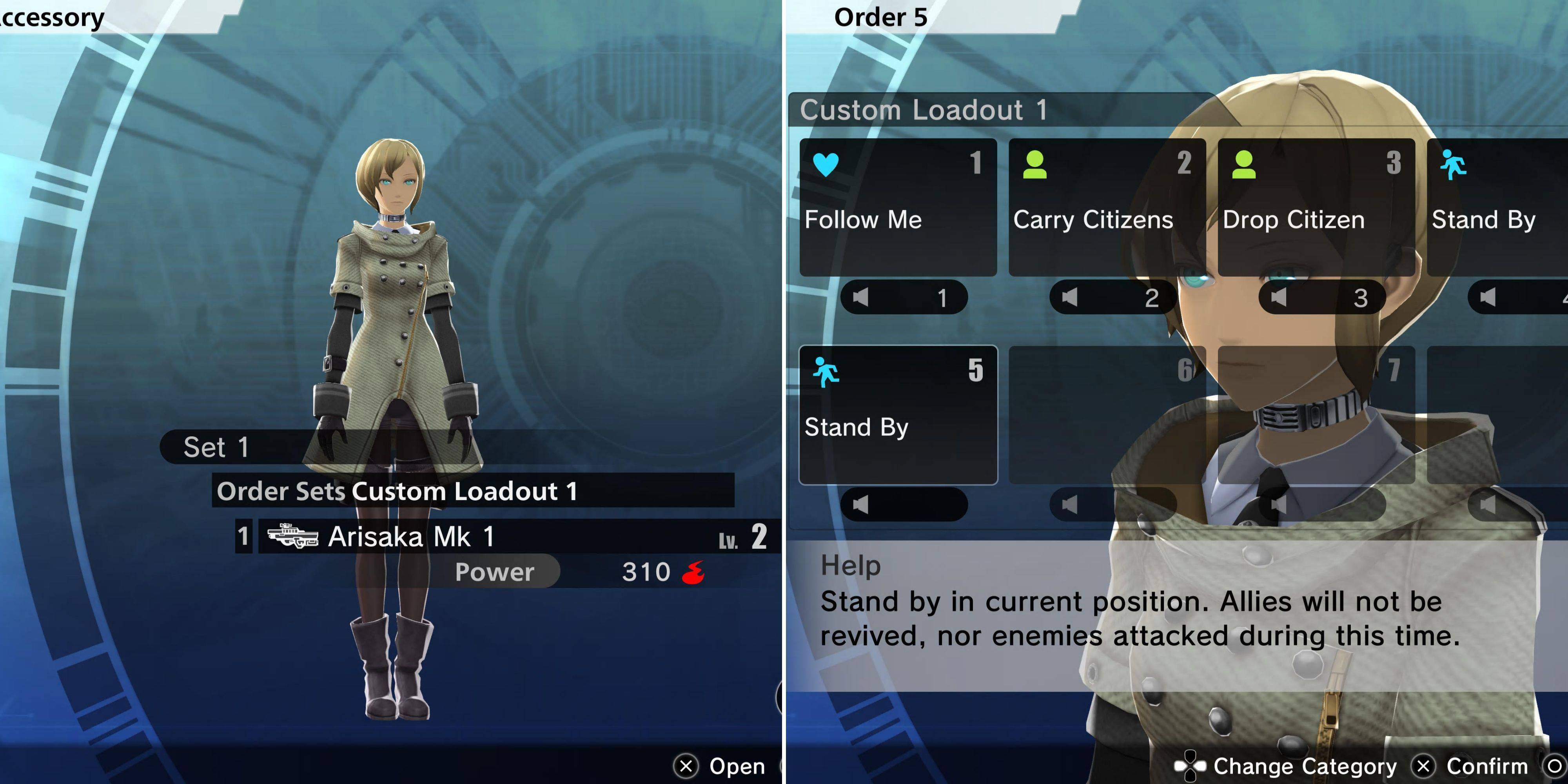
Customize your Accessory's equipment via the Loadout menu. Locate the Accessory option below your own character profile. This opens a loadout menu mirroring your own. Equip any available weapon and compatible Modules.
Accessories, unlike players, don't consume ammo when using firearms. You can also equip a single combat item; the Accessory will utilize it strategically. Note: Accessories are limited to one weapon and one combat item. Their key advantage over comrades lies in the unique commands you can assign.
Accessory Orders
The Loadout menu lets you select an Order set. Individual orders within each set are customizable by interacting with your Accessory in your cell. Select "Customize Accessory" (fifth option from the top) to choose and arrange commands. Expand your order set capacity by purchasing "Right To Assign Orders Entitlements" from the Window of Liberty Interface Entitlements (Accessory section). Remember, the chosen Order Set is locked during Operations. Available commands include:
- Follow Me
- Stand By
- Use Medical Supplies
- Prioritize Revival
- Rescue Comrades
- Carry Citizens
- Drop Citizen
- Follow With Citizen
- Capture Enemy Control System
- Capture Nearby Control System
- Capture Neutral Control System
- Harvest Resources
Issue orders during Operations using the up directional pad button or C (PC). Coordinate your Accessory's tasks with your comrades' objectives for optimal efficiency.
Best Accessory Orders In Freedom Wars Remastered
Prioritize these Accessory Orders:
Order
Explanation
While Accessories can inflict significant damage with upgraded weapons, prioritizing support roles maximizes their effectiveness. Equip them with a powerful weapon and focus on support rather than direct combat.
-
 PinwheelExperience a one-of-a-kind paper pinwheel simulator! We are thrilled to present a truly unique paper pinwheel simulator! Now you can enjoy a vast collection of realistic paper pinwheels right on your phone. The game features 9 distinct types of paper
 -
 Flaine Carroz 2ccam OutdoorDiscover the Flaine Carroz 2ccam Outdoor app, your key to a life unburdened by daily pressures. Master the art of relaxation with perfect nap spots, scenic nature walks, and insider tips for sourcing local products. For heritage enthusiasts, trade m
 -
 Mega ShowsExperience the ultimate movie hub with Mega Shows, your premier app for the newest films. Browse a comprehensive library of movie details and images, powered by data from TMDB.org. Stay current with the latest releases via our integrated TMDb API. F
 -
 Comic Reader +Tired of ads constantly disrupting your comic reading? Welcome to Comic Reader +! This exceptional app doesn’t just make reading your favorite comics easy and smooth—it also delivers deep character insights. Available only on Android, CR+ elevates c
 -
 Pik TV - Show Live TV MoviesPik TV - Show Live TV Movies is your all-in-one entertainment hub, delivering a diverse collection of content right at your fingertips. From live cricket action to complimentary movies, TV series, and exclusive web shows, this app provides it all. I
 -
 BlockashSearching for an entertaining and gripping block puzzle to exercise your mind and relax? Blockash is the perfect choice! Its intuitive controls and innovative Gem-matching mechanics offer a polished experience that promises hours of fun. More than j
-
 Marvel Rivals Season 1 Release Date Revealed
-
 Sonic Racing: CrossWorlds Characters and Tracks Revealed for Upcoming Closed Network Test
-
 Honkai: Star Rail Update Unveils Penacony Conclusion
-
 Announcing Path of Exile 2: Guide to Sisters of Garukhan Expansion
-
 Ubisoft Cancels Assassin's Creed Shadows Early Access