

"Marvel Rivals: How to Block and Mute Opponents"
For fans of hero shooters, Marvel Rivals offers a fresh and exciting experience. While it shares some similarities with Overwatch, Marvel Rivals distinguishes itself with unique gameplay and features, making it a standout in the genre. Despite its successful launch, players may encounter some challenges, such as unwanted in-game interactions.
One of the common issues players face is dealing with unwanted mic conversations. While reporting players is an option, Marvel Rivals also allows you to mute or block players directly within the game. This guide will walk you through the steps to block and mute players in Marvel Rivals, ensuring a more enjoyable gaming experience.
How to Block Players in Marvel Rivals
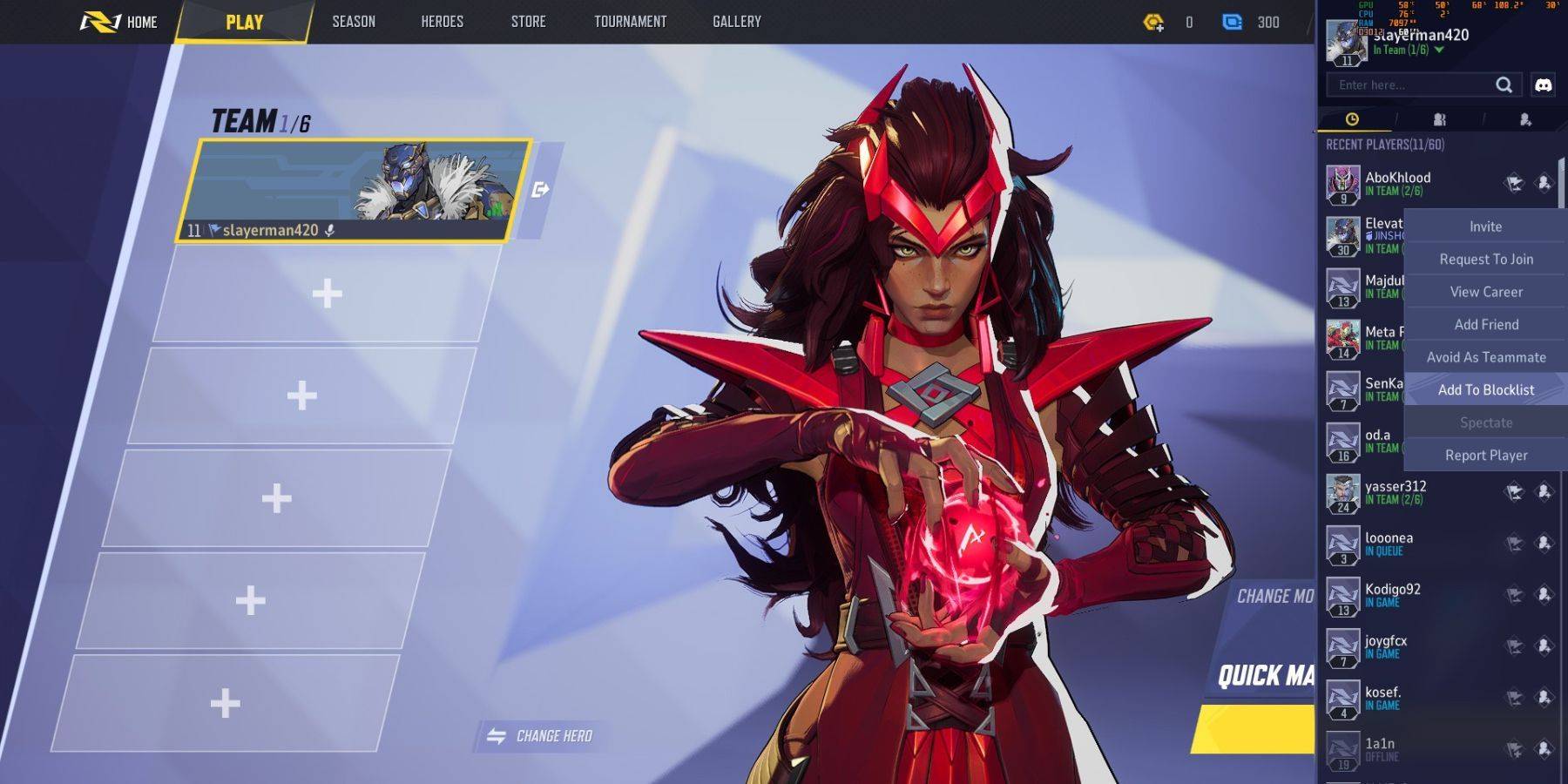
In Marvel Rivals, encountering players who aren't team players can be frustrating. To ensure you don't have to team up with them again, you can block them. Here's how you can do it:
- Navigate to the main menu in Marvel Rivals.
- Click on the Friends tab.
- Select Recent Players from the list.
- Find the player you wish to block and click on their name.
- Choose Avoid as Teammate or Add to Blocklist to prevent future interactions.
How to Mute Players in Marvel Rivals
If you prefer to mute players during a match without blocking them entirely, follow these steps:
- During a match, open the in-game menu.
- Go to the Social tab.
- Find the player you want to mute in the current match.
- Select their name and choose Mute to silence their communications.
By utilizing these features, you can tailor your Marvel Rivals experience to be more enjoyable and free from unwanted interactions. Whether you choose to block or mute players, these options give you control over your gaming environment.
-
 Once HumanOnce Human: A Post-Apocalyptic Multiplayer Survival GameOnce Human is an expansive, multiplayer open-world survival game set in a world shattered by apocalypse. Team up with friends to fight for survival, build your sanctuary, and conquer terrifying
 -
 Fake Novel: Your Own TsundereA pocket-sized anime girlfriend on your phone, ready for cute dates and warm hugs!Ever dreamed of dating a fierce Tsundere? Your wish is here! Meet Tsundere-chan, your fiery anime companion who’s small enough to carry in your pocket! ️Embark on a Hil
 -
 A Webbing Journey DemoA physics-driven sandbox adventure where you take on the role of an adorable spider tackling household tasks.Embrace Your Inner Web Designer!Step into A Webbing Journey, a physics-rich sandbox game that lets you experience life as Silky, an endearing
 -
 Sâm Lốc - Xam LocDiscover the thrilling universe of Sâm Lốc - Xam Loc, a game crafted to entertain and sharpen your mind! This distinctive card game provides a cost-free way to test your skills and strategy, requiring no internet or additional payments. Featuring abs
 -
 갓오브하이스쿨: 리부트Mergulhe no universo de God of High School: ORIGIN e torne-se o campeão definitivo! Baseado na popular webtoon coreana, este RPG colecionável traz a história à vida com mais de 800 personagens e uma jogabilidade cativante. Entre em batalhas de fantas
 -
 Run Legends: Make fitness fun!Run Legends: Make fitness fun! is more than just a fitness app—it's an interactive game that transforms your daily walk or run into an exciting high-intensity interval training experience. As you battle enemies called Sappers, which symbolize real-l
-
 Sonic Racing: CrossWorlds Characters and Tracks Revealed for Upcoming Closed Network Test
-
 Marvel Rivals Season 1 Release Date Revealed
-
 Honkai: Star Rail Update Unveils Penacony Conclusion
-
 Announcing Path of Exile 2: Guide to Sisters of Garukhan Expansion
-
 Ubisoft Cancels Assassin's Creed Shadows Early Access