

Best Settings to Reduce Motion Sickness in Avowed
Conquer Motion Sickness in Avowed: Optimal Settings Guide
Many players experience motion sickness in first-person games. If Avowed is causing you discomfort, this guide provides the best settings to alleviate it.
Recommended Settings to Minimize Motion Sickness in Avowed
The primary culprits of motion sickness in first-person games, including Avowed, are head movement, field of view, and motion blur.
Reducing Head Movement and Camera Shake
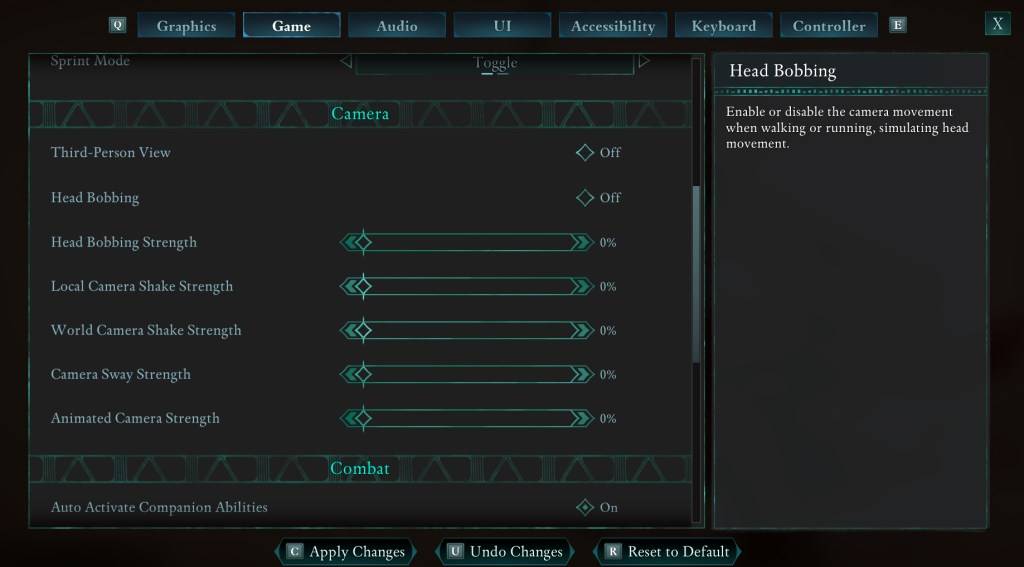
To minimize motion sickness, adjust the following settings (found under "Settings" > "Game" > "Camera"):
- Third-Person View: Your preference (On or Off).
- Head Bobbing: Off
- Head Bobbing Strength: 0%
- Local Camera Shake Strength: 0%
- World Camera Shake Strength: 0%
- Camera Sway Strength: 0%
- Animated Camera Strength: 0%
Experiment with these settings to find the balance between immersion and comfort.
Adjusting Field of View and Motion Blur
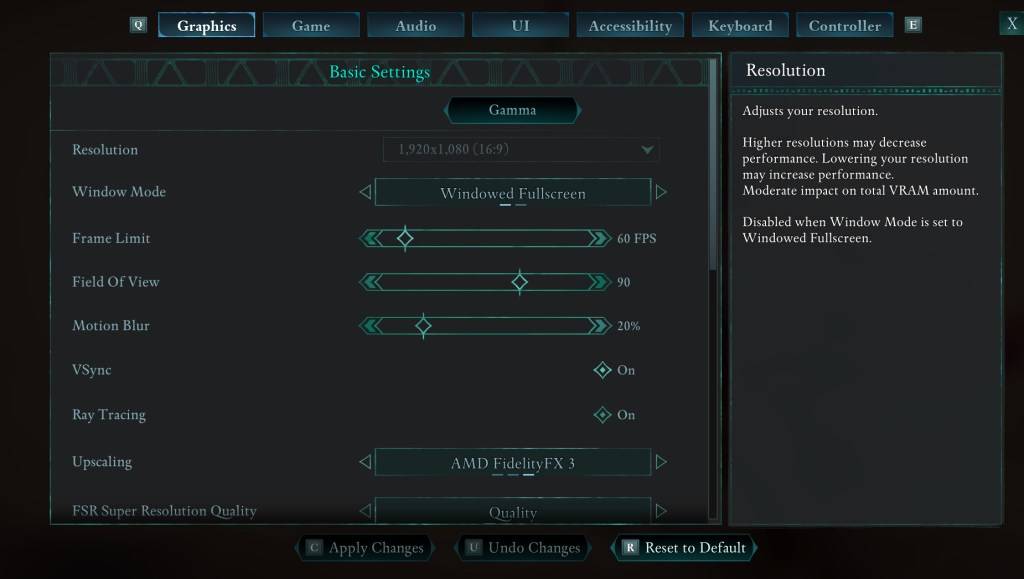
If eliminating head bobbing and camera shake isn't sufficient, adjust these settings ("Settings" > "Graphics"):
- Field of View: Start with a low value and gradually increase until you find a comfortable level. This may require several attempts.
- Motion Blur: Reducing or disabling motion blur often helps significantly. Try setting it to zero and adjust as needed.
Persistent Motion Sickness?
If motion sickness persists, continue experimenting with the above settings. Consider switching between first-person and third-person perspectives. However, if the problem remains severe, prioritize your well-being. Take breaks, drink water, and resume playing later.
These settings should significantly reduce motion sickness in Avowed. Enjoy the game!
Avowed is available now.
-
 Head Soccer CardsStep into the thrilling world of Head Soccer Cards, a sport card puzzle game where you build your ultimate team of Soccer Heads to outsmart and outscore your rivals. Each turn, you'll receive pairs of cards and must strategically pick your players t
 -
 Summoner SquadSummoner Squad transports players into the enchanting realm of Gaia Land, tasking them with assembling a powerful team of six charming heroes to stand against the encroaching darkness. Featuring a distinctive cubic art style, the game lets you summo
 -
 FNAFFive Nights at Freddy's (FNAF) is a critically acclaimed indie horror franchise developed by Scott Cawthon. As a night-shift security guard, you must monitor haunted pizzeria animatronics. Manage limited resources, operate surveillance cameras, and
 -
 MultiSave - Photo, Video Downloader for InstagramMultiSave - Baixador de Fotos e Vídeos para Instagram é a ferramenta definitiva para todos os entusiastas do Instagram! Com a capacidade de salvar múltiplas fotos e vídeos do Instagram de forma rápida e fácil, você pode agora criar sua própria galeri
 -
 Auto Stamper™: Date TimestampAuto Stamper is the ideal tool for adding a personal touch to your photos and preserving the stories they hold. This smart photo editing app lets you effortlessly stamp images with details such as date, time, location, signature, logo, and more. It
 -
 Kaorin Icon Pack ModUpgrade your phone's aesthetic with the Kaorin Icon Pack Mod. Move beyond standard Material design and immerse yourself in subtle, elegant tones and exquisite wallpapers. Every icon is individually handcrafted for a pixel-perfect display. Enjoy effo
-
 Marvel Rivals Season 1 Release Date Revealed
-
 Sonic Racing: CrossWorlds Characters and Tracks Revealed for Upcoming Closed Network Test
-
 Honkai: Star Rail Update Unveils Penacony Conclusion
-
 Announcing Path of Exile 2: Guide to Sisters of Garukhan Expansion
-
 Ubisoft Cancels Assassin's Creed Shadows Early Access