

How to Turn Off Subtitles in Avowed

Subtitles are a widely appreciated accessibility feature, yet they're not for everyone. If you're playing *Avowed* and want to adjust your subtitle settings, here's a straightforward guide on how to turn subtitles on or off.
How to Turn Subtitles On & Off in Avowed
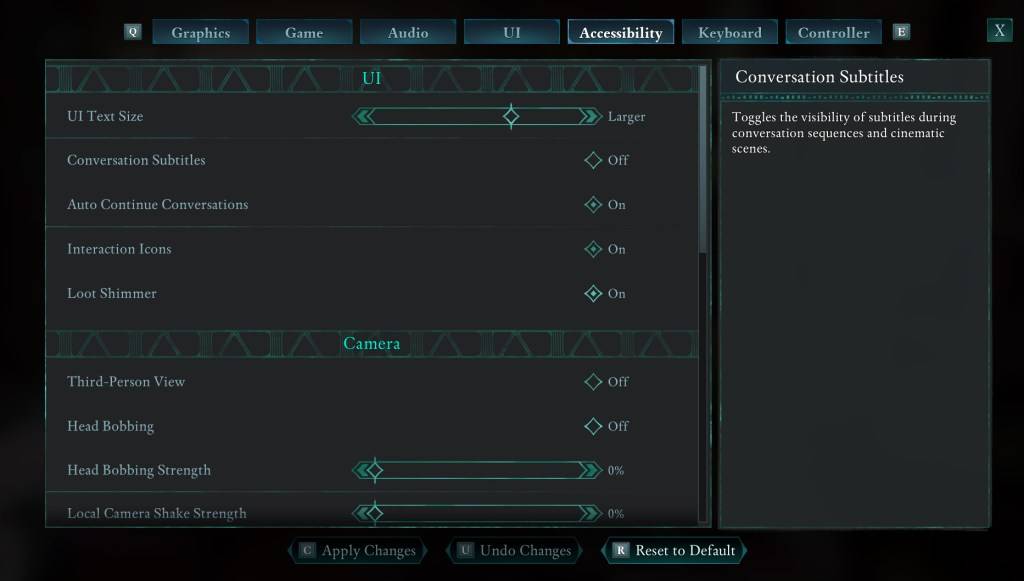
When you start *Avowed*, you'll encounter initial options for subtitles. If you accidentally choose a setting you don't prefer, don't worry—there are two convenient places within the game where you can adjust these settings.
Navigate to the "Settings" menu and select either the "UI" or "Accessibility" tab. Here, you'll find options for "Conversation Subtitles" and "Chatter Subtitles." Adjust these to your liking. For the most straightforward experience, the "Accessibility" tab is recommended, but feel free to use whichever you prefer.
Why Don’t Some People Like Subtitles?
While I personally rely on subtitles due to hearing needs, many players find them distracting during gameplay or media consumption. Preferences vary, so if subtitles enhance your experience, keep them on. If they're not your cup of tea, you can easily turn them off.
What Are Avowed’s Accessibility Options Like?
*Avowed* offers a range of standard accessibility options, though they may not be as extensive as some other games. You can customize subtitles to improve readability by adjusting their size, background opacity, and the duration they remain on screen.
Beyond subtitles, *Avowed* includes features to mitigate motion sickness, such as reducing camera shake and head bobbing. Additional accessibility settings allow for adjustments like increased aim assist, toggling crouch and sprint modes, and other modifications to enhance playability for a broader audience.
And that's how you can manage subtitles in *Avowed*.
*Avowed is available now.*
-
 Love Angels18+ Meet, compete, and celebrate victory!Step into Love Angels, a casual RPG where you dive into romantic escapades and build genuine bonds with players around the world. This isn't your typical combat-focused adventure—it's a game centered on love,
 -
 Impossible DungeonEmbark on an idle RPG adventure that challenges you to descend as deep as possible into the dungeon.Do you have what it takes to conquer the Impossible Dungeon? (Spoiler: It’s genuinely impossible!)Enjoy an ad-free experience with no pop-ups or banne
 -
 Chef StoryChef Story is a charming, cozy cooking game where you build and design your very own restaurant.Hello, Chef! Let's create the most incredible Food Park together!This park is ready to be filled with food trucks and stalls from across the globe, all co
 -
 E500: City Car DriveEnjoy a thrilling car simulation and racing experience.Take a smooth ride in the classic E500. Challenge yourself with competitive city driving using the G63 SUV and other sports cars. Master the W124! Conquer difficult tracks with no crashes and com
 -
 TrainWorks 2The Ultimate Train Simulator for Train EnthusiastsAll aboard for the future of train simulation! Welcome to TrainWorks 2 | Train Simulator, where breathtaking realism meets captivating gameplay. Become a conductor and master the railways with meticul
 -
 Hilux: Pickup Offroad 4x4Experience the thrill of an immersive car simulation and racing adventure.Are you prepared for authentic off-road driving in this SUV Hilux simulator? Get behind the wheel of other powerful SUVs like the Rav4 and Land Cruiser for a true off-road expe
-
 Sonic Racing: CrossWorlds Characters and Tracks Revealed for Upcoming Closed Network Test
-
 Marvel Rivals Season 1 Release Date Revealed
-
 Announcing Path of Exile 2: Guide to Sisters of Garukhan Expansion
-
 Honkai: Star Rail Update Unveils Penacony Conclusion
-
 RAID Shadow Legends: Mythical Champions Tier List Revealed